Managers

Give managers the tools to support their teams

Managers are the people new hires turn to first. CrewSteps gives them a clear view of what their team needs next and simple ways to help, without another system to learn.

A laughing restaurant shift manager in a black polo holding her phone beside a CrewSteps laptop showing her team’s onboarding status and a phone with a new server’s onboarding steps.
Illustrative screen with example information.

Know who needs a hand

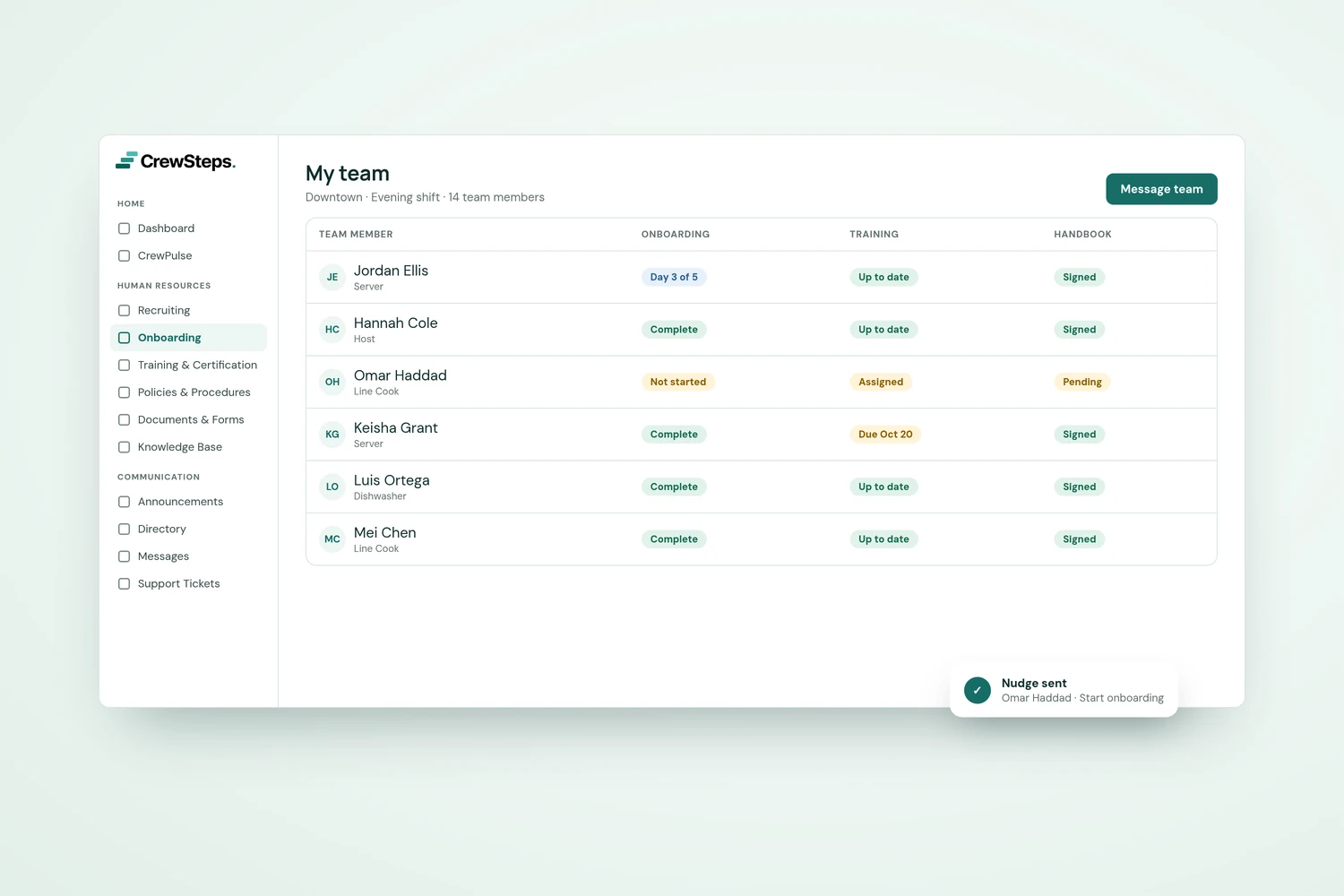
Follow onboarding and training progress, so you can spot what's still open and help before it becomes a problem.
Onboarding, Training

CrewSteps "My team" view showing each team member’s onboarding, training, and handbook status for one restaurant shift.
Illustrative screen with example information.

Keep your team in the loop

Share updates with your team, chat one-to-one or in groups, and find anyone in the directory.

Announcements, Messages, Directory

A restaurant manager laughs with two servers in black aprons during a relaxed pre-shift chat in a bright dining room.

Answers without the interruptions

Point people to your Knowledge Base, and let them raise questions as tickets, so nothing gets lost in a busy day.

Knowledge base, Support tickets

Access that fits the role

Role-appropriate access gives managers what they need while keeping confidential information protected.

Trust Center

Every core feature, one organization-wide price.

One price, every feature

Use Cookie settings to turn optional advertising measurement on or off. Closing the notice does not change your choice.